A city full of small programs
A Darker mission can introduce a weapon, launch an enemy wave, send trucks across the city and start extinguishing the beacons that keep the player airborne. Much of that behaviour lives in compact programs stored alongside the briefing text.
The map supplies the city. Object definitions supply aircraft, vehicles and their normal behaviour. A mission record places those objects, changes selected buildings and gives the actors scripts to follow. Some scripts finish immediately; others spend most of a mission waiting for a condition to become true.
We can see the division clearly in mission one. Its presentation introduces the setting and the first weapon. Its flight script waits for the objectives, pauses briefly, sends a message and stops. The enemy craft keep moving and fighting while that script waits. Following this small example leads into the same machinery that runs the later blackouts and reinforcement waves.
What goes into a mission record?
Archive DARKER.04 contains 124 records. Of these, 107 contain world setup and 17 contain presentations alone. The records also cover special sequences and supplementary programs, so the archive includes more than the ordinary campaign's missions.
A world record begins with a shared header, followed by beacon coordinates, building lists and object templates. English, French and German sections provide the text. Relative pointers connect entry points and scripts to the surrounding record.
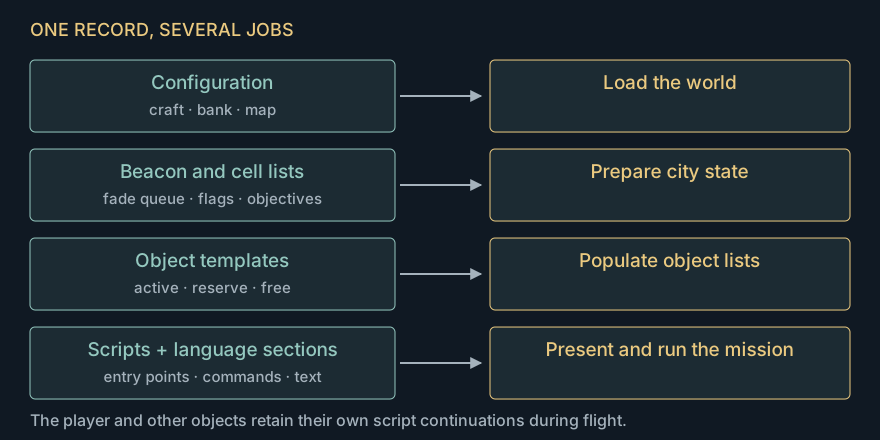
The configuration selects a craft profile, model bank and map. It also controls whether a supplementary script is loaded. The upper and lower halves of the configuration byte have different meanings for surface and underground profiles; following the loader is essential to choosing the right city.
There are separate entry points for presenting the mission and for the player's ongoing mission script. This is how the engine can run a briefing before flight, then leave a much smaller program watching the mission's progress. Record format and configuration
Three groups of objects
The setup parser reads three groups, each terminated by FF:
| Group | Initial destination | Typical purpose |
|---|---|---|
| 0 | Active lists | Aircraft and vehicles present from the start |
| 1 | Reserve lists | Reinforcements waiting for a script command |
| 2 | Free lists | Definitions available to later spawning mechanisms |
Within those groups, objects are divided into air, ground and static categories. A moving-object template takes thirteen bytes, including its definition, heading, starting cell and script or target reference. A compact ground-vehicle record takes six bytes and points into its route program.
The high bit of the template header marks an object for the mission's outstanding-object count. This gives the author a way to put both required enemies and incidental opposition into the same scene. Destroying an uncounted aircraft can make a fight easier without satisfying the objective wait.
Reserve activation commands request a number of objects from a category's queue. The parser builds those queues by prepending each definition, reversing source order within the category. Activation removes objects from that head and prepends them to the active list. The order of the bytes in the resource therefore takes two reversals on its way to the eventual update list. The scenario browser shows the actual queue order.
Free-list craft have another use. Enemy-occupied hangars can launch them when the player is nearby and the site's timer allows it. The hangar's target-permission bit also enables that launch site, while its damage bit disables it. This explains a curious campaign detail: several entrances become active well before the player receives Brent Ground. Mission 50's introduction tells us those occupied stations have already been marked for destruction. Reserve activation · Hangar launches
An object remembers where it stopped
The main bytecode dispatcher has 77 handlers. An opcode selects one, and the handler consumes its operands. A normal return takes execution straight back to the dispatcher for the next instruction.
A waiting object keeps a small amount of execution state:
| State | Role |
|---|---|
| Continuation | Next script byte to execute |
| Deadline | Earliest clock at which execution can resume |
| Checkpoint | Place to return to if a condition still fails |
| Checkpoint time | Coarse timestamp for timed waits |
That is enough to suspend a program across many frames. The object's movement callback remains free to move, aim and attack while the script's continuation waits for its deadline.
This also makes STOP quite specific: it installs a resident stop script and returns control to the caller. The object remains in the world. A fighter whose setup script has finished can continue flying under its ordinary AI callback.
The dispatcher uses the x86 call stack to keep the common path short. It pushes its own address before entering a handler. Ordinary handlers return there; the delay path removes that return address, saves the continuation and checks the scheduler again. An overdue script can consequently execute several commands in one invocation. Scheduler disassembly and probes
Delay means “advance the schedule”
The ordinary delay instruction adds a duration to the existing deadline.
Suppose a deadline is 1,000 and the next instruction adds 500 ticks. A frame that finally services it at 1,200 schedules the next point for 1,500. Only 300 ticks remain. That preserves the intended spacing along the script's timeline despite a late frame.
Clock comparisons use wrapping 16-bit subtraction. The scheduler waits when the high bit of now − deadline is set; otherwise the continuation is due. This handles a deadline just beyond the word's wrap. As with other half-range clocks, nearby past and future values remain distinguishable within a 32,768-tick span.
Conditional waits have a second mechanism. CHECKPOINT remembers a stream position. If an objective test fails, the interpreter returns to that point and adds a retry interval. With mission one's multiplier of 50, retries are 400 ticks apart—about 0.8 seconds. Commands placed between the checkpoint and the test can therefore run again on each attempt.
Following mission one
Here is the core of mission one's flight script in readable form. These are the commands at resource offsets 002D–0037:
CHECKPOINT
WAIT_FOR_OBJECTIVES
DELAY 10
MESSAGE duration=25, width=27
MESSAGE duration=40, width=42
STOP
The record's timing multiplier is 50. DELAY 10 adds 500 ticks, roughly one second. The first message entry is empty and is consumed without a delay; the next entry displays the completion message.
We exercised these original bytes with controlled objective counts and clocks. The test's starting clock is arbitrary, making the scheduler boundaries easy to see:
| Clock | What happens |
|---|---|
| 1,000 | Two objectives remain. Save the checkpoint and schedule a retry for 1,400. |
| 1,399 | Objectives have been cleared, but the retry is still one tick away. |
| 1,400 | The wait passes; the 500-tick delay moves the deadline to 1,900. |
| 1,900 | Skip the empty message, display the next one and move the script deadline to 4,000. |
| 4,000 | Execute STOP. |
The displayed message expires at 3,900 in this trace, slightly before the script resumes. Message lifetime and script continuation use separate clocks and durations. That separation lets text remain visible while another part of the engine continues working.
The objective test itself combines two things: a selected list of map cells and the outstanding-object count. Destroying the last counted enemy is sufficient only when the required building list has also been satisfied. Landing early goes through the same test; an incomplete underground run takes the abort presentation and leaves the mission available to retry. Mission-one trace · Return and retry
Update order becomes part of the behaviour
Objects live on linked lists. The frame walks the player/craft list, then aircraft, then ground vehicles, followed by weapon/effect work. Later it runs the player's mission interpreter.
An activation command inserts at the head of the relevant active list. If an aircraft script activates a ground vehicle, the ground-list walk is still ahead, so the new vehicle can receive a callback in that update. If it activates another aircraft, the air-list walker has already passed the head and continues from its current object; the newcomer waits until the next update.
Similarly, reinforcements activated by the player's late mission script wait for the next frame's walk. This is a small difference, but it matters when reconstructing the order in which a mission develops. Native update-order traces
Ground vehicles add a second interpreter. Their compact routes describe movement phases, turns, pauses and branches. Treating those bytes as ordinary mission commands produces plausible-looking nonsense: the two languages reuse byte values for different purposes. The demo investigation uncovered this while tracing its Nightmare convoy. Vehicle routes · Demo history
Programming a blackout
Delphi's 225 energy beacons lie on a 15-by-15 lattice. Mission scripts can request individual changes or runs along a row or column. A shared fade updater then changes each affected beacon through intermediate strengths.
The mission header's beacon list is a queue for the individual-failure command. Reading the list during setup establishes its pointer; later commands consume coordinates from it. This lets a script interleave failures with enemy waves, messages and objective waits.
There is also a reusable grid-failure program in supplementary record 04_015/7. From a fully powered city, the original script and fade updater extinguish 224 beacons, leaving (72,126) untouched. In our fixed-step replay the last change occurs about 25 seconds after entry. Its radio messages fragment as the power drops, ending partway through a word.
Nightmare has its own much longer choreography: individual failures, row and column sweeps, reversals that restore power, and waits for combat objectives. Its late stage also enables a forced altitude of 512 before returning the city to full power. That is why its sequence makes better sense as a map plus a program timeline than as a single “blackout area”. The beacon-sequence viewer lets us inspect these changes. The resulting effects on lift and charging are covered in the flight article.
When bytecode needs some x86
Seven setup blocks, spread across four records, contain native x86 instructions. The parser calls them with the current object and a small helper table. They can set velocities, energy, heading and placement, or patch data that later setup will consume.
One block copies the player's position into subsequent object records. Another stores the player's model pointer into the immediate operand of a later instruction; when that later block runs, it assigns the model to another object.
These are compact ways of staging a scene around the player's current state. They also explain why a static dump of object coordinates can disagree with the eventual scene: some of those coordinates are templates waiting to be rewritten. The setup interpreter carries the resource forward through both bytecode and native calls. The seven native blocks
What the city remembers
Successful progression packs selected building-state bits into the save record. Four two-bit codes fit into each byte. Delphi has 3,811 eligible cells, occupying 953 bytes; Halon has 1,870, occupying 468 bytes. The map and model definitions determine the traversal order, so the save needs no coordinate beside each code.
For an ordinary Delphi building, those two bits mean damage and permission to attack:
| Code | Damage bit | Target bit | Restored state |
|---|---|---|---|
| 0 | Clear | Clear | Intact, unmarked |
| 1 | Set | Clear | Damaged, unmarked |
| 2 | Clear | Set | Intact, marked |
| 3 | Set | Set | Damaged, marked |
Halon uses the same two bits as a damage-stage number. Delphi's lattice beacons have their own restoration rule, turning a saved zero into off and a nonzero code into full output. Their in-flight fade levels collapse back to those endpoints on restore.
On a successful exit, new damage is committed. After a failed attempt, reloading restores the previously committed city, discarding that attempt's changes. The base map supplies the rest of the world, and model-variant counters are rebuilt during loading.
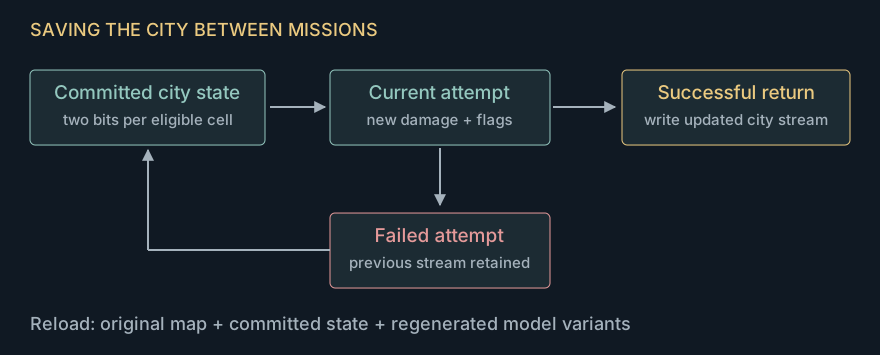
That is how a few compact programs and a little saved state produce a continuing campaign. The scripts author each visit, while the saved bits let earlier visits leave their marks on the same streets. The save editor makes this arrangement particularly easy to inspect alongside the mission browser.