Open our mission atlas and you will find a battlefield called B0_C3_2A, extracted from Dynamix's 1994 mech simulation Earthsiege. Its briefing sends you after radar stations and listening posts. You can open it, find the buildings, and inspect the routes running between them.
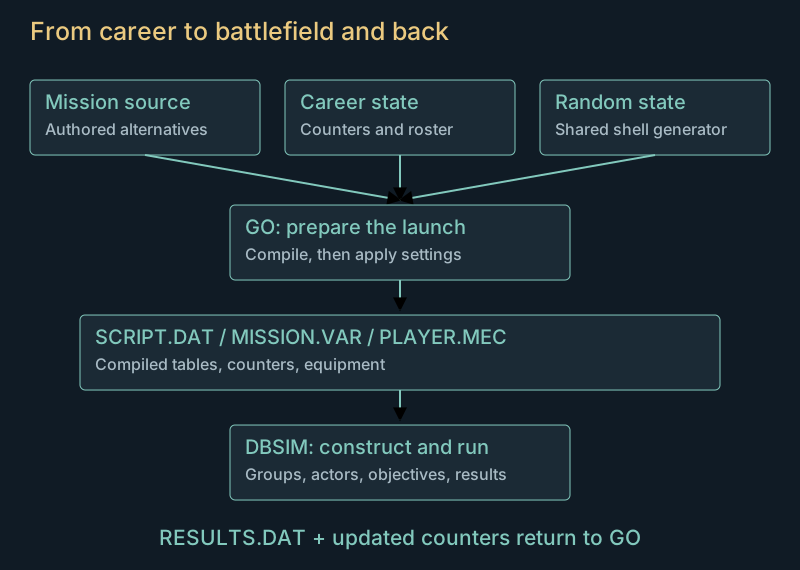
That makes it tempting to regard the mission file as a saved battlefield. But several things have already happened before the first HERC appears. The menu program has prepared campaign counters, made random choices, compiled the mission, applied settings and written a player roster. The simulator has then read those results and constructed the actors.
The distinction explains why two visits to the same mission can differ, why a building can depend on earlier events, and why a convincing map preview can still represent a situation the game would never launch.
Two programs and a set of handoff files
Earthsiege divides much of its work between GO.EXE, which runs the shell, career and hangar, and DBSIM.EXE, which runs the simulation. The shell prepares a mission for the simulator. On return, the simulator supplies results that the shell folds into the career.
Three launch files keep the pieces together:
| File | What the simulator receives |
|---|---|
SCRIPT.DAT |
Compiled mission settings and tables of points, routes, actors, groups, areas and triggers |
MISSION.VAR |
One hundred signed, sixteen-bit mission counters |
PLAYER.MEC |
The selected player's group and equipment roster |
A map extracted from SCRIPT.DAT is only part of that handoff. Giving it an unrelated test roster or counter array changes the starting situation. Our first compiler experiments deliberately used simplified inputs to expose branches. The atlas now uses complete launch sets produced by the original shell and passed through the original simulator's constructors.
The counters act as compact shared memory between authored mission conditions, events during play and campaign progress. A trigger can change one; a later condition can read it. Their meaning comes from those consumers. Assigning all of them zero or one is useful for exercising code, but it does not describe a particular player's campaign.
What the launcher knows
Before compiling, the shell puts the current campaign node and step into counters 1 and 2. Counter 3 receives the selected time or palette option. Counters 4, 5 and 6 each receive a random value from zero through eleven. Campaign launches retain the remaining history values. Single-mission mode clears the array first and uses 99 as its campaign marker.
The mission name therefore cannot reconstruct the launch state by itself. B0_C1_61, for example, occurs at different steps in different battle-set tables. Earlier results can also have changed the counters it sees.
There are direct uses of that history in the source. B0_C1_10 tests whether counter 15 is above zero and can set one building's initial condition to zero. A building's starting damage is thus capable of carrying an earlier event into a later battlefield. Identifying the exact event in a particular career requires following the counter's producers as well as that test.
The random generator is shared by shell operations. At startup, the program copies a table of 56 nonzero words and advances the generator a time-derived number of times. Further operations consume more values before compilation. A zero warm-up count still leaves that original nonzero table in place; it does not mean a generator filled with zeros.
Our atlas offers two repeatable variations from this original generator. Its campaign examples start with the original new-career hangar and a fresh event history at the chosen stage. They let you inspect an authentic launch procedure with known inputs. They are not historical saves from a campaign someone played through to that point. Launch preparation and random state
The same positions can hold a different force
B0_C6_1A gives a particularly clear example. The two published variations use the same campaign occurrence and starting roster. Only their random initialization differs.
Both construct eighteen HERCs, four flyers and eight ground actors. Their point, heading, route, area, trigger and group tables agree. So do the final actor positions. Yet ten of the HERC entries differ in chassis or equipment.
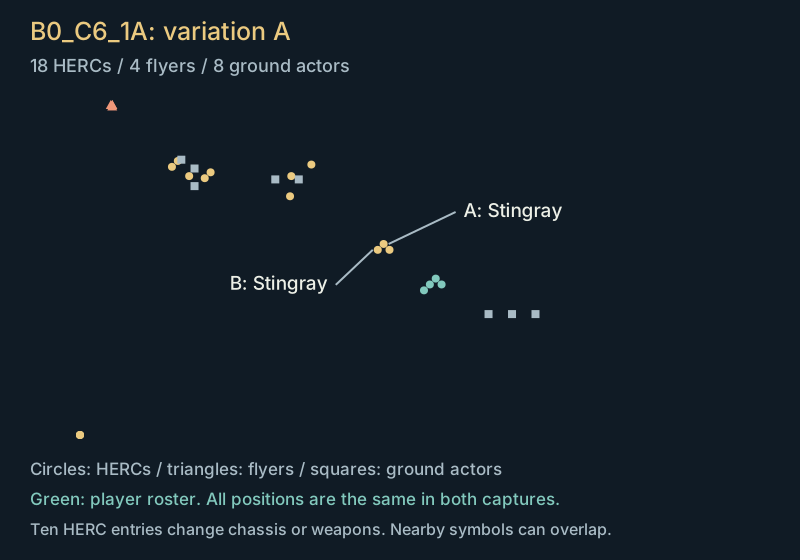
18 HERCs, 4 flyers, 8 ground actors. A and B use SCORPION.DTS, the Stingray model.
Top-down plot of the original constructed positions, before the first simulation update. It includes groups waiting for activation. Symbols show actor categories; this diagram omits terrain. The two captures use generator warm-up counts 17 and 42.
The pair marked A and B changes from Stingrays to Mongooses. Other entries exchange heavier chassis, and weapons can change even when the chassis remains the same. This pair of captures has the same number of combatants; elsewhere, authored alternatives can change counts too.
A randomly generated landscape would look very different from this. Here the author has supplied the positions and the alternatives, and the compiler resolves the choices. The shape of the mission remains recognisable while the force occupying it changes.
You can inspect the complete scene in the mission atlas. The two views there also expose the original briefings and equipment. The diagrams above use those same launch records.
The shell has the last word on settings
Compilation does not finish the preparation. The shell applies overrides before it writes SCRIPT.DAT.
Campaign mode disables the unlimited-ammunition, unlimited-power and invulnerability options, supplies its difficulty value, and selects terrain from the current node. Single-mission mode applies the menu options and makes another random choice for the terrain bank.
This was the source of an early preview error. Compiling B0_C1_61 alone produces the temperate terrain selection. Launching it in campaign node 1 changes that selection to ice. The compiler's output was internally coherent; we had stopped before the shell finished its work.
It also explains why filenames make a poor guide to terrain. The campaign's eight nodes choose temperate, ice, desert and urban environments through a separate table. Some urban scenery belongs to missions whose raw source headers or filename families give little indication of it. The urban ruins example is a useful place to look. Post-compilation overrides
Waiting groups and events on the ground
After reading the handoff, the simulator creates the actors and assigns them to groups. Some groups have activation triggers. They already have members and starting positions, but ordinary group dispatch waits for the trigger to latch.
Spatial triggers can watch the player, the player's group, one side, or a category such as HERCs or flyers. They contain one or more areas and latch when an eligible actor enters any of them. A rectangle excludes its boundary. A radial area uses an inexpensive octagonal distance approximation, also with a strict boundary, and ignores altitude.
The latch persists. Its first activation can clear or increment a mission counter. Later entries do not repeat that particular action. Destruction notifications use a separate mechanism, with group and individual actor actions; those notifications are not latched in the same way.
The frame order matters. Group dispatch runs before the spatial trigger scan. A trigger latched by that scan becomes available to a later group pass. When that pass clears a waiting group's activation pointer, it does not also execute the group's controller in the same branch. Treating trigger entry as an immediate call to every waiting actor would advance the encounter too early.
The map browser displays these waiting actors because they are useful to inspect. Seeing them in the atlas does not mean they have all started moving or fighting. Spatial triggers and activation
What counts as completing the job?
Return to the radar-station mission. The listening posts and radar towers belong to a particular ground group. A nearby generator belongs to another. Destroying the generator can be tactically useful, but it does not satisfy an objective that asks about the first group.
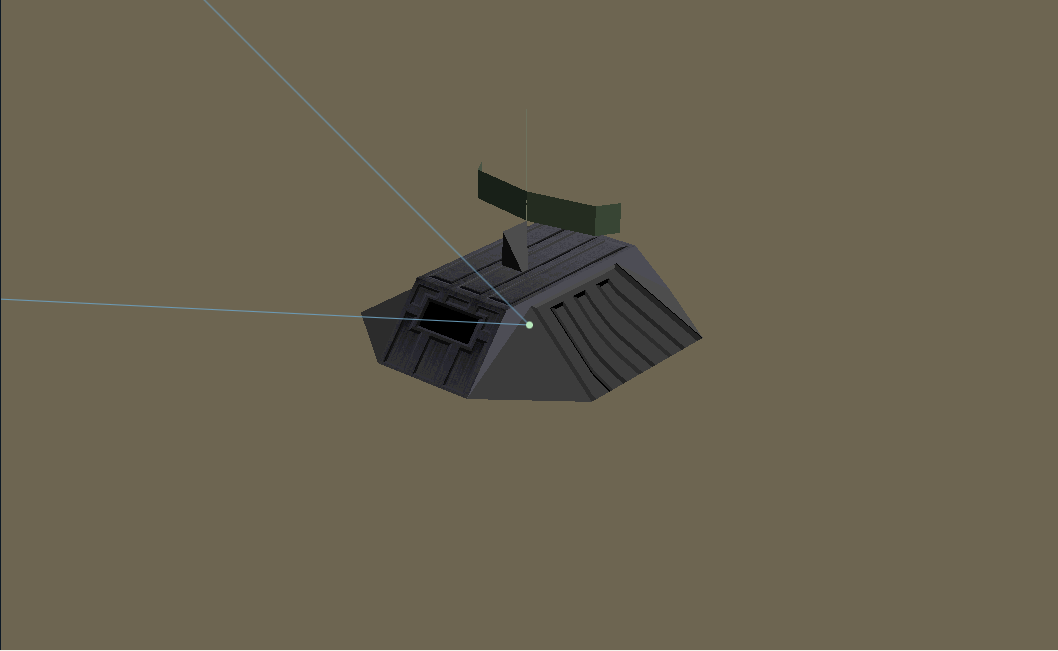
The simulator evaluates different mission kinds through different conditions. Some depend on a route finishing, some on target damage, some on a protected actor's safety or status. It also distinguishes completion from being safe to leave. An objective can be fulfilled while a recognised opponent still makes the situation unsafe.
Those checks are polled through countdowns. In the ordinary case, both the polling interval and the pending terminal outcome use a countdown of 10,000, reduced by the simulation's frame ratio. At the nominal ratio of 256, that is forty updates, approximately four seconds. Reading the constant as milliseconds would give the wrong delay.
The displayed outcome is then separate from the result grade sent to the shell. One says what the simulator should report now; the other participates in campaign progression. Reusing the on-screen completion code as a campaign grade would send successful missions down the wrong branch. Objective decisions and timing
A campaign is a graph
The shell compares the returned grade with a threshold determined by mission kind. Lower grades are preferable. Grades above the threshold choose branch 1; the rest choose branch 0.
Within a node, that branch can choose between alternative filenames at the next step. At the end of the node, it chooses the next node. The eight nodes form a graph with alternate routes and several opportunities for terminal failure.
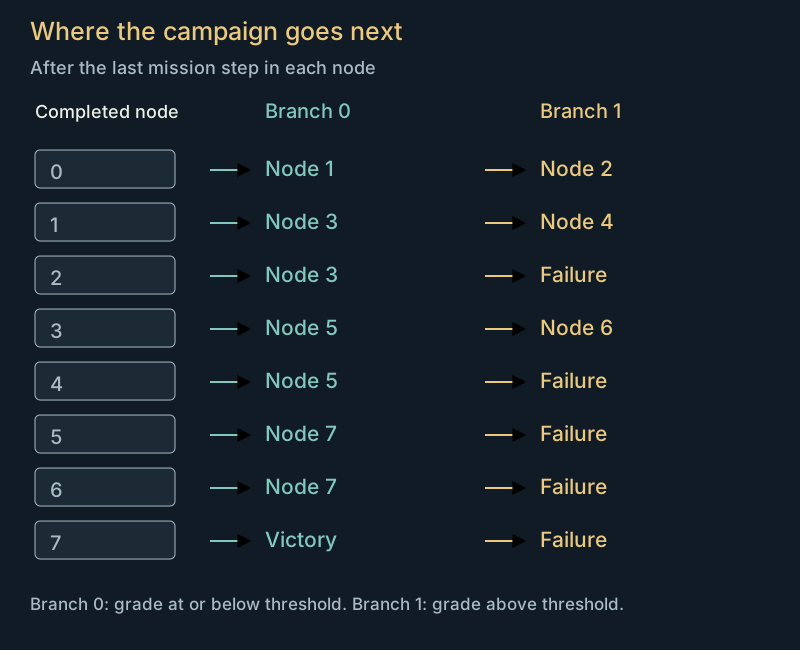
After the last step in node 0, a grade at or below the threshold leads to node 1.
The original transition table. This control starts at a node's last step; earlier steps can choose a different mission filename without leaving the node.
The three supplied battle-set tables give nodes different lengths. They are alternative itineraries through this structure. Node numbers should not be presented as eight consecutive campaigns, and a mission's ordinal position needs the selected battle set as well as its filename.
History also survives a subtle handoff. Entering a new node clears counters in the stored career record, but the live shell counter array survives the ordinary Next Mission path. Compilation and the following save restore those live values over the cleared record. Looking at the clear operation alone would suggest that history was lost. Following the entire transition shows why it persists. Campaign branches and state
Bringing the squad home
The simulator writes recoverable value, salvaged weapons, crew conditions and statistics to RESULTS.DAT, alongside the result grade. It separately writes the mission counters. The shell reads them, updates the armory and processes the surviving squad.
There is more to that return than adding credits. Dead wingmates are replaced. Their equipment goes to the armory or recovery budget according to its condition. Repair shares are calculated at a particular point in the transaction, so credits recovered later do not increase those already assigned shares. Technology unlocks and chassis construction advance with mission progress.
The order even affects resupply: an existing weapon type can be replenished before newly unlocked technology is processed. A newly available weapon therefore cannot participate in that earlier replenishment pass.
These details connect battles through material consequences. The combat article follows the calculation from a wreck to salvage. The career system then turns that salvage, the squad's condition and the mission result into the next launch.
Exploring the evidence
The mission launch notes describe the compiler inputs and captured variations. Mission runtime follows triggers, objectives and destruction events. Campaign research covers branching, saves and the complete return transaction.
The public atlas uses launch examples from the base game, with their starting history and roster described alongside them. The research tools also accept imported career states and recorded playthroughs. Those supply the equipment and accumulated events of a particular campaign.