Earthsiege's soundtrack has more than one route out of the computer. Some notes go to an FM synthesizer. Others trigger samples from the game's own percussion bank. On a MIDI setup, a different set of tracks can be sent to an external synthesizer.
That division lives inside the music files and their drivers. Recovering a list of notes is therefore only the beginning of recovering the score. We also need to know which notes the selected device receives, which instruments the driver assigns, how it manages voices, and when the game tells the music to change.
The original software gives us answers to each of those questions, along with a few surprises. Its advertised MT-32 option is the strangest: in the base release we examined, it leaves the melodic parts unrouted.
A score with several destinations
Earthsiege uses HMI's protected-mode Sound Operating System, commonly abbreviated SOS. Its twenty base-game HMP resources contain tracks with device assignments. When a song starts, the scheduler matches those assignments against the installed drivers.
For the usual FM setup, the physical music driver handles synthesized notes and a separate digital MIDI driver handles sampled percussion. The game supplies the melodic and drum banks, and installs both destinations. A track's device assignment decides where it goes.
The route identifiers have a few aliases. A generic MIDI track can reach the MPU-401 or AWE driver. An FM track assigned to the OPL2 class can also reach OPL3. The MT-32 has its own identifier, which is not one of the generic MIDI aliases.
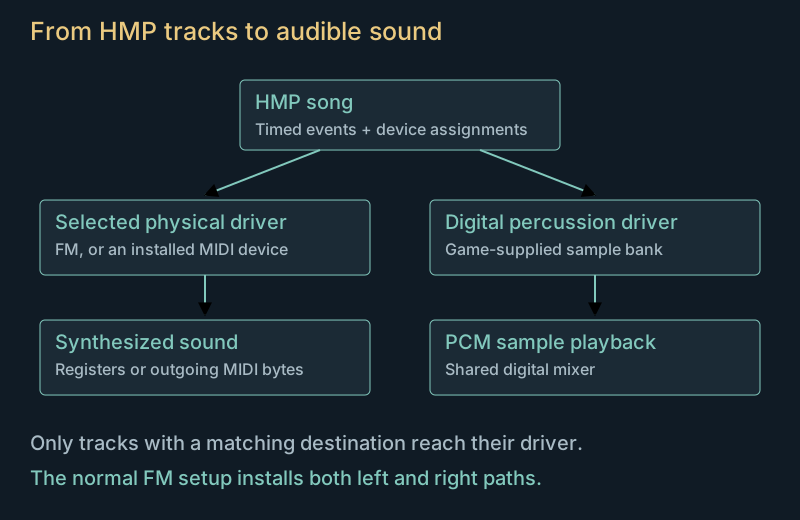
A straightforward MIDI export can obscure this arrangement. Sending every track to a soundfont can play alternatives together, assign the wrong sound to a part, or lose the separate sample bank. Even a correctly filtered General MIDI version can have an authored gap: DESERT has no melody routed to the normal GM path in the supplied data.
The filenames provide another tempting shortcut. WIN2 sounds like a likely victory cue, but the traced campaign-victory dispatcher selects INTRO2. WIN2 and SHELLC are registered resources with no identified selector in the supplied shell, campaign, return and introduction dispatch paths. The callers establish where the named pieces actually play. Music roles and device routing
The clock in the music header
Every supplied base song has 120 in its timing field. That value could easily be mistaken for a tempo. Following it through the original initializer shows that it is passed to timer registration as a frequency in hertz.
The scheduler advances on that timer. Tracks contain encoded delays between events, and the original delay reader determines how many bytes each value consumes. We checked all 103,958 stored delays, including the longer unsigned encodings, against that reader.
Once a delay expires, the scheduler emits an event toward its selected destination. There are still several steps before that event becomes audible: channel and gain processing, the installed driver, voice allocation, synthesis or sample playback, then mixing.
Those layers explain why a faithful event list alone does not guarantee faithful sound. A note arriving at the right time can still have the wrong pitch bend, release, volume or voice assignment.
The game also installs a loop filter for ordinary music playback. Marked loops consult a repeat count: zero rejects the repeat, 65,535 repeats indefinitely, and other nonzero counts decrement. Combat music supplies 255. That value is finite, even though it is large enough to look effectively endless during an ordinary encounter. A separate controller restarts a current song when it finds it stopped, subject to its other branches.
Our listening exports stop at a declared duration and add a release tail. They do not recreate a complete mission's loop decisions or changes of score. The full game integration tests the loop callback separately. Scheduler and loop checks
What the FM driver contributes
The archived OPL2 and OPL3 modules do more than translate a note number into a frequency. They choose voices, apply instrument banks, track controllers and sustain, and write registers in a particular order.
We ran those original modules against explicit emulated ports and recorded the writes. The comparison fixtures include dense chords, every program and drum key, pitch-bend range changes, sustain and voice exhaustion. That exercises situations in which two apparently reasonable MIDI players can make different choices.
The OPL3 module uses nine paired stereo voices. Its downward pitch-bend path indexes the range by voice, whereas the OPL2 module indexes by MIDI channel. Both modules also have a release cache that overlaps a frequency cache at high operator indices. Earlier frequencies can consequently influence release writes on later note starts.
Those are properties of the supplied drivers. Replacing them with a generic MIDI-to-OPL player would remove part of the behaviour we are trying to recover. After the original driver has produced its register stream, Nuked OPL3 supplies chip emulation for the auditions.
The digital side runs alongside it. The percussion driver keeps track of up to eight playing drum notes, while their samples play through the shared digital backend. Device volume and pan are shared across MIDI channels. When the tracking entries fill, the original tries to evict a voice on the incoming channel; if none exists, it can start a sample without tracking it in that small table. The larger backend still limits actual playback.
These details are easy to miss when auditioning a quiet passage. They become audible candidates under overlap, sustained notes and heavy percussion. They are also testable without guessing by ear: register writes, sample starts, stops and gains can all be compared directly.
Listen to the two FM paths
These excerpts use the original scheduler and FM drivers, the game's sampled percussion, and chip emulation. Each starts eight seconds into its full render and lasts twenty-four seconds. They retain the rendered levels; the clips have not been individually normalized to sound equally loud.
| Piece | OPL2 + samples | OPL3 + samples |
|---|---|---|
| Introduction / victory | ||
| Patrol: BATTLE1A | ||
| Encounter: BATTLE1B |
The FM module and percussion driver are original software paths. Output resampling, relative mix and a historical card's analogue circuitry remain distinct parts of the sound. The auditions reconstruct the software paths; a particular Sound Blaster model can add its own output characteristics. Audition method and limits
The MT-32 option with no melody
The installer offers an MT-32 selection and the driver archive contains its module. However, none of the twenty base HMP resources assigns a melodic track to the MT-32 device identifier. The separate setup song has the same omission.
Running the original music initialization and physical driver confirmed what the file headers suggested. Melodic tracks remain without an installed destination. The digital-percussion route still works because it belongs to the separately installed sample driver. In the menu song, its first hit arrives at tick 220, about 1.83 seconds after playback starts.
The MT-32 driver does emit bytes: setup, volume and cleanup commands. Counting output bytes alone could therefore suggest that the arrangement was present. Inspecting their contents and the track destinations establishes why there is no melody.
There is also no General MIDI-to-MT-32 program conversion or instrument-bank upload in this loading path. Sending the available GM parts to an emulated MT-32 is a useful listening experiment, and the native reconstruction offers it separately. It retains the incoming program numbers, so the resulting instrumentation can differ considerably. That experiment cannot recover an absent authored MT-32 arrangement.
The expansion's thirteen additional HMP files likewise contain no nonzero-velocity note-on track assigned to the MT-32 identifier. That is an observation of their decoded routing and events; the complete expansion driver path has not been compared to the same extent as the base game. The MT-32 investigation
When the battle changes the music
At mission start, the game chooses one of three pairs: BATTLE1A/B, BATTLE2A/B or BATTLE3A/B. The A piece accompanies the quieter state; the B piece is its encounter partner.
After a clock deadline, a living, enabled side-1 actor can request the encounter piece when it is close enough, or when it passes the cockpit detection and bearing tests. The current piece then loses fifteen volume units per music-controller update.
The sequence is 100, 85, 70, 55, 40, 25, 10, then zero. On the following update, the old piece stops and the partner loads at volume 100. The two pieces do not overlap during this transition.
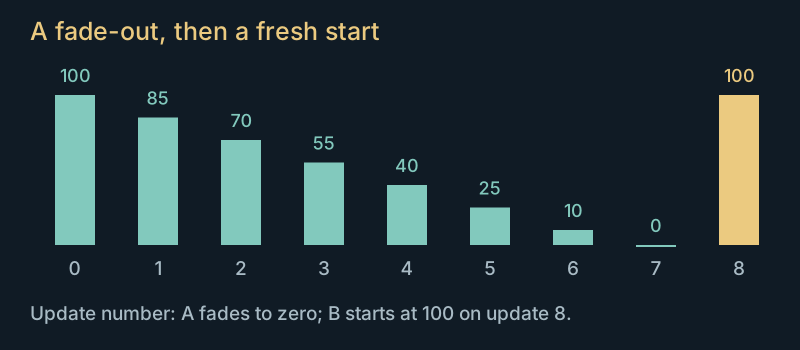
Update 0: the patrol piece is still at volume 100. The encounter piece has not started.
A discrete illustration of the original volume sequence. Moving the slider does not alter the listening clips or simulate elapsed seconds.
Returning to the quieter piece contains a curious original comparison. After ground threats cease to qualify, a living, enabled flyer farther than 18,928 units can prevent the return to A. That check does not inspect its side or waiting-group state. We verified the comparison direction in the instructions; replacing it with a more intuitive nearby-enemy test would change when the score settles down.
The music controller also runs before the ordinary simulation and pause dispatch. Its updates should not be counted as HMP timer ticks, or assumed to stop wherever ordinary movement stops. The transition conditions
Drums share the machine with footsteps and gunfire
The sampled percussion ultimately shares a digital backend with sound effects. The original HMI mixer modules maintain a ring buffer, allocate up to thirty-two voices, and generate specialised mixing loops. Executing those loops let us compare integer gain, saturation, stereo balance and the timing of voice removal.
A requested property is not always an applied property. The PCM pitch setter stores a rate, but ordinary playback descriptors do not enable the flag that makes the mixer use it. Controlled tests at requested rates of one half, one and fifteen consequently play identically through that ordinary path. Adding audible variation solely because a setter exists would invent behaviour.
Positional effects have similar distinctions. Position updates change the sound object's pan and the active voice's volume, but do not update that already playing voice's pan. Another helper attempts to combine repeated instances of the same effect, yet compares a stored distance with itself. The first nonzero-distance submission wins even if a later source is nearer.
These effects make call order part of the sound. So does animation: footsteps are requested from authored attachment movements and threshold crossings, not from a timer playing a generic walking loop. Damage, turning, target acquisition and engine startup have their own sound gates.
The soundtrack and effects can therefore be investigated at several levels. Song events establish the arrangement. Driver commands establish how it is voiced. Mixer buffers establish the digital samples. Recorded missions establish which sounds the game actually asks for, in what order. A successful check at one level leaves meaningful work at the others. Digital mixing and footstep triggers
Further listening and research
The sound comparison page keeps the auditions together. The music research notes contain device identifiers, code addresses, original-driver comparisons and the remaining hardware boundaries.
For the connection between a detected threat and the behaviour that follows it, see How the HERCs choose a fight. The reconstruction article describes how we run the original code and compare its outputs, including sound commands that have no visible trace in a screenshot.